Learning path › Lesson 6
Hyperlinks
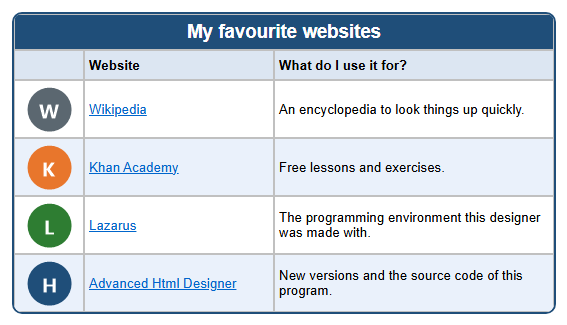
What is a hyperlink?
A hyperlink (link for short) is text or an image you can click. Behind the link is an
address (URL), for example https://en.wikipedia.org. In the browser a text link is usually blue and
underlined.
Two kinds of links
- Text hyperlink: click the cell and on the
 Cell (C) tab click
 TH+. You get two questions: first the
address (URL), then the text shown as the link (by default the text already in the cell).
 TH- removes the link again; the text stays.
- Image hyperlink: click a cell with an image and click
 HL+ (Create image hyperlink). Type the address.
 HL- removes the link.
https://. Preferably copy
it from the address bar of your browser, so you make no typing mistakes.Make it yourself
- Make a table of 3 columns and 6 rows, with a title and the headings Website and What do I use it for?
- Type the names of the websites in the second column and what you use them for in the third column.
- Turn every name into a text hyperlink with TH+.
- Put a button in the first column with Add image (e.g.
knop-w.pngfromlessen\afbeeldingen) and make it an image hyperlink with HL+. - Test your links: click Click here for extra functions at the bottom, open the test browser and click every link.
Behind the scenes
In the HTML code a link is an <a> element. The address is in href:
<a href="https://en.wikipedia.org">Wikipedia</a>With an image hyperlink the <img> is between <a> and </a>.
Exercise
Add a row at the bottom with a website you use often (for example the website of your school or your sports club). Make both the name and the button clickable and test the link.
Solution
On the Table tab click AR. Type the name and the explanation in the new row. Click the cell with the name and click TH+; paste the address from your browser and confirm the text. In the first column choose a button with Add image, click HL+ and paste the same address. Open the test browser and click both links.
Working on Linux? Then open the example yourself with Open table designer: folder
lessen/en, file les06-websites.htd.